Ad Manager, part of Pyre.Stream
Ad breaks in the quiet moments.
The worst ad break is the one that lands as a match starts. Ad Manager moves your Twitch ad breaks into the downtime instead: between matches, on the halftime, on the countdown before the next one. You pick how many minutes an hour. Pyre picks when.
Twitch only. Off on every channel until you turn it on.
Where breaks land
Between matches. Never in one.
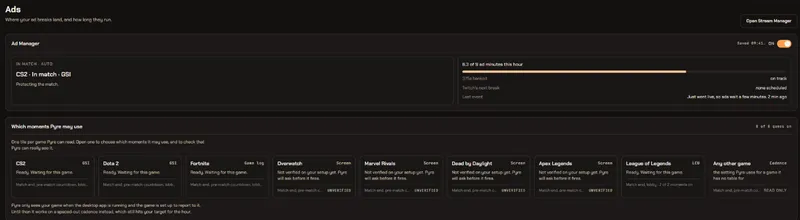
A moment is a stretch of downtime long enough to hold a break. Pyre knows five of them, and you can turn any of them off per game. When it finds one, it runs the break there, sized to the gap it found.
- Match end, once the scoreboard is up
- Halftime, in the games that have one
- The countdown before a match starts
- The lobby, used only to clear a whole upcoming ad block at once
- Dead or spectating, off until you ask for it
CS2, moments Pyre may use
Ad minutes an hour
One number runs the whole thing.
Set how many ad minutes you want in an hour. Twitch pays its revenue share on any hour with at least three, and Pyre's default of nine clears that with room to spare. The number is a ceiling as well as a target: Pyre never banks more than it in an hour, and it counts the breaks Twitch runs on its own toward the same total.
- Anything from 3 to 15 minutes an hour
- A cap on the longest break Pyre may run, from 30 to 180 seconds
- The hour never runs past your target plus one break
Three modes
Auto, Suggest or Observe. Your call.
Turn it on and it starts in Auto. Drop it to Suggest if you would rather be asked, or to Observe to watch what it would have done for a few streams before you trust it. Change it mid stream and it takes effect on the next moment Pyre finds.
- Run ads now is a real button in every mode
- Observe keeps a written log of every call it would have made
Your chat is told
Chat hears why.
Every break Pyre runs comes with one line in your chat, from your bot, saying how long it is and why now. The line is yours to edit. Pyre fills in the length and the reason, and nothing else.
- An optional second line when the break is over, off by default
- Say it as your bot or as yourself
The other half
Twitch's own breaks get pushed out of your match.
Twitch schedules ads in blocks, on its own clock. When Pyre can see you are in a match and one of those blocks is less than 90 seconds away, it spends one of your snoozes to push it past the match, then clears the whole block in the next downtime instead of letting it drip into play.
- Works at any target, zero included
- Never spends your last 10 minutes of pre-roll-free time
- The hour's log says what happened and why
This hour
How it sees the game
It reads the game from your PC.
With the Pyre.Stream desktop app running, Pyre reads the match state the game itself reports, so it knows a round ended before your viewers do. Nothing about your screen leaves your computer.
- CS2 and Dota 2 through Valve's game state integration
- Fortnite through the log the game writes
- League of Legends through your own League client
- No detector? Pyre still spreads your minutes across the hour on a spaced-out cadence, so two breaks never land together
More games are on the way through on-screen reading, which also stays on your PC.
The honest parts.
What it does, what it will not do, and what it needs.
It moves ads, it does not remove them
Your viewers see the same ad minutes an hour you asked for. Fewer of them land on live play, and the hour still adds up. It is not an ad blocker for your own channel.
Twitch only
It rides Twitch's own ad schedule, snooze and commercial APIs. There is nothing equivalent to point at on Kick or YouTube, so it does nothing there.
Run ads now, in any mode
A real button on the card and a !adsnow command in chat. Observe means Pyre will not act on its own. A button you press is you acting.
Mods can run them, if you let them
Only the broadcaster can start a commercial on Twitch's side. Pyre can route a mod's !adsnow through your account instead, and that switch is off until you turn it on.
A rolling hour you can read
Every break on your channel, the ones Pyre ran and the ones Twitch ran on its own, in one list with the reason beside each. The meter on the card is derived from it.
Manage it from Pyre.Bot too
The same settings, the same card and the same hour, from the bot portal. Mods you have given access can see it there.
Read the guide: Ads in Pyre.Bot